Aion2do User Guide
Aion2do is a tracker that helps you conveniently manage your daily and weekly AION 2 tasks. Learn all the features through this guide!
Visual Guide
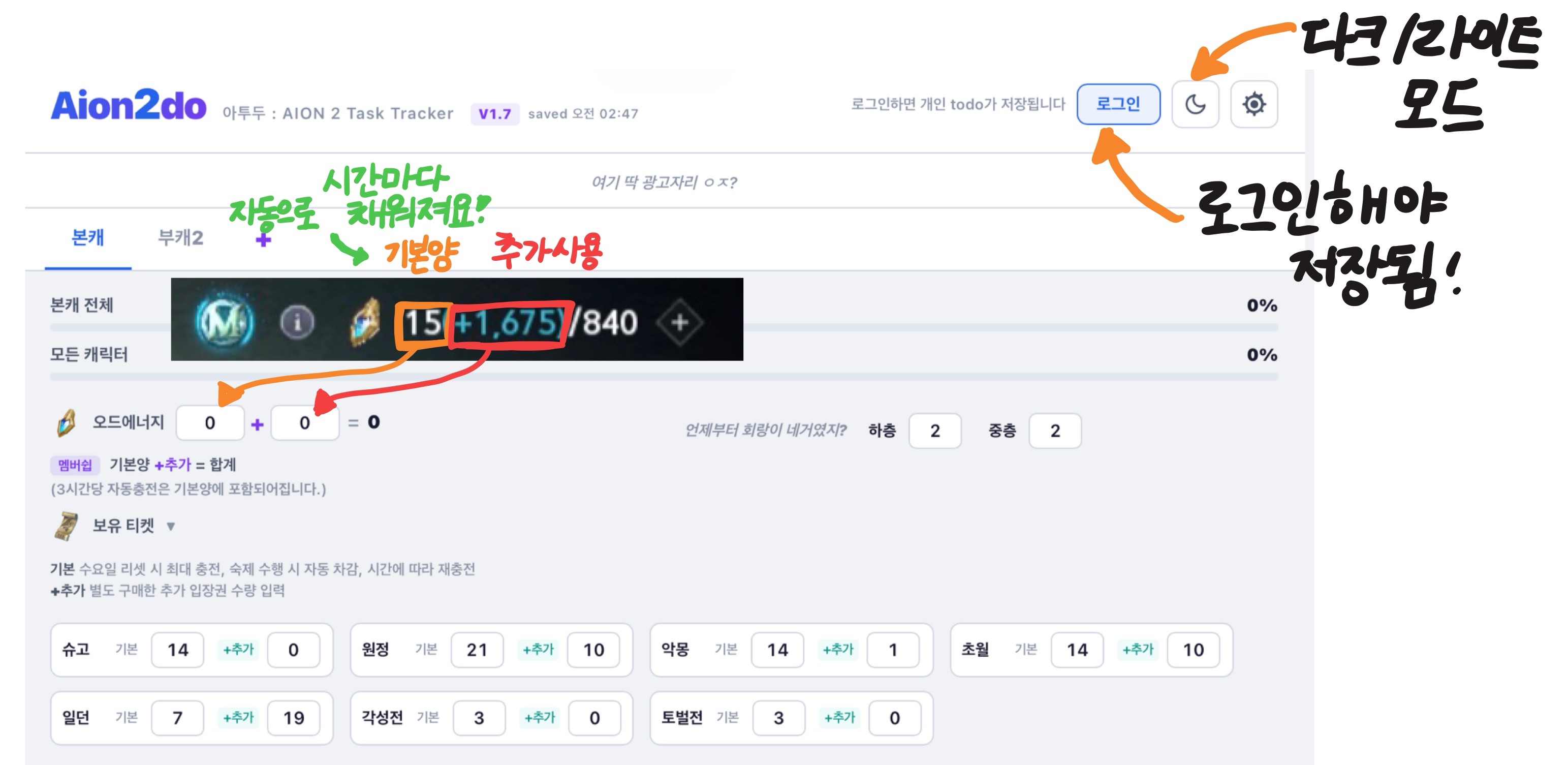
Detailed Guide
Getting Started
- Log in to save your data in the cloud (accessible from mobile, PC, anywhere!)
- You can use it without logging in, but data will only be saved in your browser
- Daily tasks reset at 05:00 every day, weekly tasks reset at 05:00 every Wednesday
Characters
- Press + to add an alt
- Double-click a character tab to rename it
- Hold and drag a character tab to reorder (desktop), or reorder in Settings (mobile)
Recording Tasks
- Use the + / - buttons to record your progress
- Hold + (0.5s): Instantly complete to max
- Hold - (0.5s): Instantly reset to 0
- Ctrl + Mouse wheel: Hold Ctrl (Mac: ⌘) and scroll over an item for +1/-1
- Hold and drag items to reorder
- Hover to reveal the delete (x) button
- Press "+ Add Item" to create your own custom tasks
Ode Energy
- Displayed as Base + Extra = Total
- Auto-recharges every 3 hours (Membership 15 / Non-membership 10), included in base
- Base Ode max 840, Extra Ode max 2000
- Hold +: Fill Ode to max instantly
- Hold -: Empty Ode to 0 instantly
- Transcendence/Expedition: Membership 120 / Non-membership 60 auto-deducted
- Sanctuary: Membership 160 / Non-membership 80 auto-deducted
- Deduction order: Base first, then Extra if insufficient
- Tasks are blocked if you don't have enough Ode
Owned Tickets
- Base: Current amount. Auto-deducted on task completion, recharges over time
- +Extra: Enter the number of extra entry tickets you purchased separately
- Extras appear in purple and are reflected in the weekly task max
- Green numbers in weekly tasks show the auto-recharged amount over time
- Deduction order: Base first, then Extra — same as in-game
- Rechargeable: Expedition (1 at 05/13/21:00), Shugo/Nightmare (2 at 05:00), Transcendence (1 at 05/17:00)
- Non-rechargeable: Daily Dungeon, Awakening Battle, Suppression Battle (reset every Wednesday)
Alerts
- Get notified at your preferred times for Shugo Festival, Abyss Corridor, and more
- Ode Energy alerts are based on base Ode (including auto-recharge)
- The threshold (default 800) can be changed freely!
- You can set a different alert sound for each notification
- Alerts are independently configurable per character!
Memo
- Leave memos freely for each character
- Choose from plain text, counter, or checkbox
Conversion / Breeze Shop
- Conversion & Breeze items are shared per server (same across all characters)
- Material Conversion Ode: 16 per server + 4 per character per week
- Breeze Shop (Membership): Ode 16(+4 per char), Unknown Rift 21, Instant Daily 21, Instant Nightmare 14
- Managed in a collapsible section alongside Memo and Alerts
Settings (Gear Icon)
- Membership ON/OFF: Changes Ode recharge and task consumption amounts
- Browser notifications: Must be allowed for alerts to work
- Alert sound: Choose your preferred notification sound
- Character management: Delete alts here!
This site is an unofficial fan site made by an AION 2 player.
It has no direct connection to NCSOFT or AION 2.